

The coordination screen-share has a real limitation: one person drives while everyone else watches. A superintendent, a facilities manager, a trade partner, each of them catches different things, but only if they can actually read the space. Here's how to get a Navisworks model onto a Meta Quest so the right people can walk it themselves, wirelessly, before anything gets built.
TLDR:
- Navisworks clash detection catches geometry conflicts but misses access, sequencing, and constructability issues that surface at human scale.
- Walking a federated model in VR at full scale surfaces problems that superintendents and facilities managers cannot catch on a flat screen.
- VR annotations sync two-way with ACC, Procore, and Revizto, keeping field findings in the same issue log as everything else.
- Resolve runs full federated Navisworks models on the Meta Quest without a tethered PC or model reduction in most cases.
What Navisworks Does and Where It Falls Short
Navisworks is the coordination backbone on most complex construction projects. It pulls together models from multiple disciplines, structural, mechanical, electrical, and plumbing, then runs automated clash detection across all of them. When a pipe routes through a beam, Navisworks finds it.
The limits show up after the clashes are resolved. A clash-free model tells you objects don't occupy the same space. It won't tell you whether a technician can reach a valve five meters up a congested mechanical corridor, or whether a maintenance corridor that reads fine in plan feels impassable at human scale. Those issues pass automated detection every time.
Navisworks also runs on a Windows desktop. One person drives the screen while everyone else watches. The superintendent with thirty years of field experience sits in the back of the room, looking at a 2D projection of a 3D model, expected to catch constructability problems that will not surface until installation.
Clash detection is a starting point.
Why Clash Detection Alone Doesn't Finish the Job
Automated interference checking is a binary test. Two objects either occupy the same space or they don't. Pass that test and the model moves forward.
The issues that survive it are a different category:
- A ceiling-mounted air handler can have perfect clearance from every surrounding element and still be unreachable for maintenance because the access route requires a technician to work in a space too narrow for a scissor lift.
- Code-compliant corridor widths look fine on a drawing, yet feel physically impassable once you account for equipment that will actually move through them.
- Ductwork routed above a row of electrical panels clears every clash rule and blocks every panel door.
Sequencing conflicts are harder still. This BIM clash detection guide context matters here: clash detection has no concept of time. It won't catch a situation where two trade partners are both code-correct but physically unable to install in the same space during the same phase without one undoing the other's work.
On complex MEP-heavy projects, these are the issues most likely to surface during construction clash detection reviews on site, after the design is locked and rework carries a real cost.
How VR Changes What a Model Review Can Surface
Standing inside a model at full human scale is a different cognitive experience than watching someone move through it on a monitor. Depth perception activates. A corridor that reads as spacious on a flat screen can register immediately as too tight once you're standing in it. A ceiling-mounted unit that looks reachable from a plan view sits obviously out of safe working range when you're looking up at it from the floor.
That perceptual shift matters most for the people who don't spend their days in Navisworks. A superintendent walking a VR model reads space the way they read a job site, not a drawing. They notice that a valve sits above a piece of equipment with no clear access point, or that two specialty contractors are routing through the only logical path for installation sequence. That feedback rarely surfaces in a desktop screen-share, where the reviewer is watching someone else's cursor move through a compressed view they can't fully parse.
Facilities managers catch a different category of issue in BIM coordination and clash detection reviews. Their concern is what happens after handover: whether maintenance staff can physically reach equipment for routine service, whether filter changes require disassembling adjacent systems, whether egress is clear in an emergency. Walking the model at scale before construction starts is the only point in the process where their input can still change the design at low cost.
What "Wireless Standalone" Means for a Job Site
PC-tethered VR requires a gaming PC within cable range of the headset. In a job trailer, that means cord management every session. On an active site, the headset goes nowhere the cable doesn't allow.
Standalone headsets like the Meta Quest 3 carry their own compute, one of the clearest wireless VR wins for construction projects. A superintendent or owner can put one on in a trailer, walk through a model, hand it to another stakeholder, and move on. No PC setup, no IT involvement, no tethering someone to a desk for a review meant to simulate a site walk.
The tradeoff is raw compute power. Large BIM models cause lag that will overwhelm standard draw approaches on standalone hardware. That's where the engineering work lives. Resolve's Wellington Engine uses virtualized geometry and custom occlusion culling to run full-size federated models on Quest hardware without reducing the model or requiring a tethered machine. The model that came out of Navisworks goes in as-is.
For non-technical reviewers, the wireless format lowers the barrier to participation. Handing a standalone headset to a facilities manager or a trade partner requires almost no instruction. A tethered setup introduces enough friction that reviews tend to stay in specialist hands.
Navisworks to Meta Quest: Export Steps
The path from Navisworks to a Meta Quest headset is shorter than most VDC engineers expect, but a few settings will break the workflow if skipped.
Start with your federated model in Navisworks. Append each discipline file, structural, mechanical, electrical, plumbing, into a single project before export. Resolve can federate models internally, but combining disciplines in Navisworks first gives you one clean NWD to upload.
The export setting that trips most people up is "May be re-saved." Without it, the NWD is locked and Resolve cannot read it correctly. Set this before saving.
Object properties carry through intact. Materials, equipment types, quantities, and metadata from source Revit or CAD files all come through. Reviewers in the headset can tap any object and pull up its properties, which matters when a superintendent needs to identify equipment or a facilities manager is checking manufacturer specs against available clearance.
Once the NWD is ready, upload it directly to Resolve via file upload or pull Procore BIM models through a connected ACC or Procore project. The model processes through the Wellington Engine and opens on the Quest without any manual optimization on your end.
Multi-User BIM Review Across Devices
Not everyone on the project will put on a headset. That's fine. Resolve runs the same session across VR, browser, and iPad simultaneously.
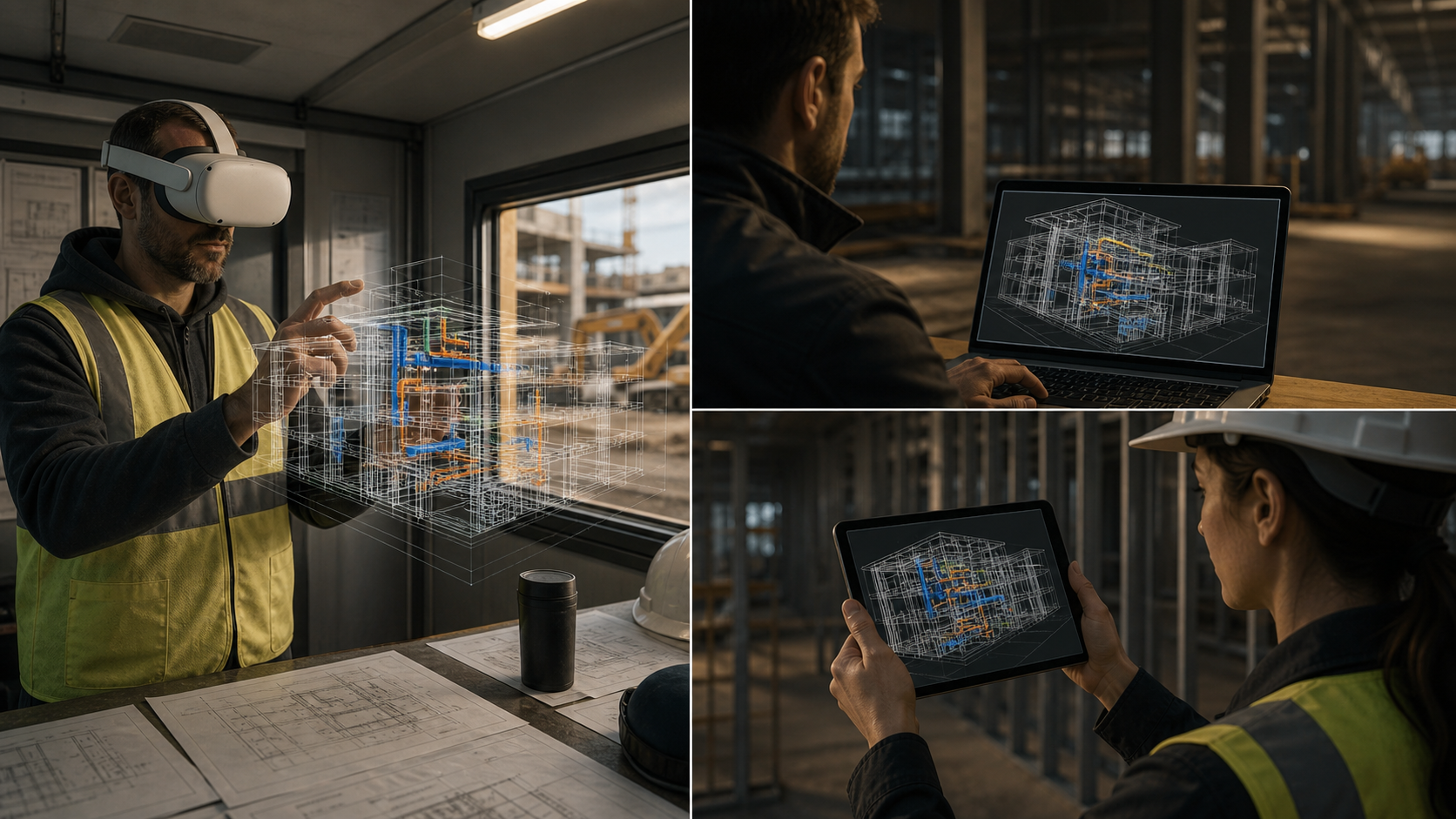
A superintendent walks the model in the Quest. A project manager joins from a browser with no download, no account required, just a shared link. A trade partner pulls it up on an iPad. All three are in the same model, looking at the same geometry, in real time.
| Device | Who typically uses it | Setup required | Can follow VR perspective | Can move independently |
|---|---|---|---|---|
| Meta Quest (VR) | Owner, facility manager, Superintendent, trade partner | Headset on, Resolve app | Yes (leads the session) | Yes |
| Browser | Project manager, owner, remote stakeholder | Shared link, no download or account | Yes | Yes |
| iPad | Field manager, facilities manager | Resolve app or shared link | Yes | Yes |
Browser and iPad participants can follow the VR user's perspective directly. When the superintendent walks to a congested mechanical bay, every other device moves with them. Anyone can break out of follow mode, move through the model independently, then rejoin.
The stakeholders most likely to catch access and sequencing issues are often the least likely to wear a headset. Bringing a facilities manager or a trade partner into a browser view of the same session removes that barrier without pulling them out of the spatial conversation.
Issue Creation and Sync in VR
Spotting a problem in the headset is only useful if it ends up somewhere the team can act on it. Resolve lets you create an annotation directly in VR, pinned to the exact location in the model where you found the issue. No notes app, no screenshot emailed after the fact.
Those annotations push to whichever issue tracking tool the team already runs: ACC, Procore, or Revizto. The sync is two-way. Status changes in those tools reflect back in Resolve, so the VR review and the issue log stay aligned without manual reconciliation.
This matters because VR findings have a history of dying in a silo. A coordinator captures a dozen concerns during a walkthrough, they live in a chat thread, and they never make it into the formal issue log. Connecting the annotation to ACC or Procore means the issue enters the same workflow as everything else the team is already tracking.
Third-party issues from connected tools are also visible inside the headset. A reviewer can pull up the Revizto or ACC issue list, tap an entry, and teleport directly to its location in the model without leaving the session.
Resolve's Navisworks-to-Quest Pipeline
Resolve's Wellington Engine, written in C++ and compiled to native graphics targets including Vulkan, WebGPU, and Metal, handles the geometry optimization that lets a full federated Navisworks model run on standalone Quest hardware. Virtualized geometry and custom occlusion culling do the heavy lifting. The model goes in as-is, no downsizing, no PC tether.
Resolve launched as an early BIM viewer on the Meta Quest store, was featured at Meta Connect, and built one of the first VR integrations for Autodesk BIM 360. Those engineering decisions, made early and built for wireless standalone hardware, are what allow large complex models to run stably on a headset today.
Across more than $50B in construction projects and over 6 GW in data center portfolios, the teams getting the most out of coordination are the ones getting the right people into the model early enough to change something.
From Clash Detection to Full Spatial Review
Clash detection is a starting point. The access issues, sequencing conflicts, and maintenance gaps that cost real money live just past what automated checks can find. Putting your Navisworks model into a Meta Quest and walking it with the people who know the field is where that second layer of review happens. Start a trial to bring your federated model into the headset and see what your team finds.
FAQ
What are the main alternatives to Navisworks for BIM model review on complex construction projects in 2026?
Navisworks handles clash detection well but stops there. For the constructability, sequencing, and access issues that pass automated detection, teams use tools like Resolve, Revizto, and Autodesk Workshop XR. Resolve runs full federated models on wireless Meta Quest headsets so superintendents and facilities managers can review at human scale without a PC tether. Revizto adds cloud-based issue tracking but its VR feature requires a PC connection and has seen limited recent updates.
How does VR improve construction model reviews compared to traditional 2D plan walkthroughs?
Depth perception and scale change what reviewers catch. A corridor that reads as adequate on a flat screen registers as physically impassable when you are standing in it. Superintendents read space the way they read a job site, not a drawing, so access problems, sequencing conflicts, and clearance issues that survive both 2D review and clash detection surface during a VR walkthrough while the design can still change at low cost.
Can I run a Navisworks federated model on a Meta Quest 3 without a gaming PC?
Yes, with the right preparation. Export your federated NWD with the "May be re-saved" setting turned on, then upload it to Resolve. The Wellington Engine uses virtualized geometry and custom occlusion culling to run the full model on standalone Quest hardware without downsizing or a PC tether. Object properties from source Revit and CAD files carry through intact, so reviewers can tap any element in the headset and pull up specs or equipment data.
What construction tools integrate with Resolve for real-time BIM model review?
Resolve connects directly to Autodesk Construction Cloud (formerly BIM 360), Procore, and Revizto. Models sync automatically through those connections, and issues created during a VR or browser session push back to whichever issue tracking tool the team already runs. The two-way sync means findings from a headset review enter the same workflow as everything else the project team is tracking, without manual reconciliation.
How can AI help construction teams work with complex Navisworks models beyond the VDC team?
Resolve's AI Spatial Assist lets non-specialist reviewers query the model in plain language. A superintendent can ask where a specific piece of equipment is located and go straight to it without learning to drive the model. A facilities manager can filter by system type or ask about clearance dimensions. Model knowledge that would otherwise stay with the BIM coordinator becomes accessible to whoever needs it during the review.
It's time to build in months, not years.